

TL;DR
Skills turn your repeatable workflows into named building blocks. Each skill is a small
SKILL.mdfile under~/.codex/skillsthat describes a workflow you want Codex to know about everywhere.Codex surfaces a compact ## Skills section instead of pasting full playbooks. The model sees each skill’s name and description plus a pointer to where its source lives on your machine. That is enough for it to know what exists.
You use Skills to stop retyping the same runbooks. Incident checklists, release steps, and “how we run tests” move out of every
AGENTS.mdand into a library that follows you between projects.To try Skills, you only set up a small skills directory and set a feature flag. Create
~/.codex/skills, add aSKILL.mdwithnameanddescription, enable the experimental Skills flag in your test config, and restart Codex to see a new entry under ## Skills.Treat Skills as a library. Keep names and descriptions short, focus on workflows you repeat across repos, and refine each
SKILL.mdover time.
1. Context: Runbooks in every prompt
If you use Codex regularly, you probably have a few prompts and workflows that you keep retyping or pasting into AGENTS.md. Common examples are “how we deploy to staging”, “how to triage a production incident”, or “how we create diagrams for documentations”.
You can shove those into project docs, but it has real costs. Long instructions inflate every prompt, consume most of the available context window, and are hard to keep consistent across repos.
Skills aim to solve that problem. They give you a place under ~/.codex/skills for reusable playbooks, and Codex turns that into a small skills section that the model can see on every run. The model learns that a skill exists, what it does, and where to find its detailed description, without you pasting big blocks of Markdown into each conversation. Think of MCPs but for workflows instead of tools.
2. Mental model: A library of named workflows
A skill is a named entry in a library that Codex loads at startup. Conceptually, each skill is:
A short name that you can reference in prompts and logs.
A description that explains what the skill does and when to use it.
A Markdown body with detailed instructions that you maintain for humans.
Codex does not send the full body to the model. Instead, it builds a skills list and injects that list into the instructions as a ## Skills section. Each bullet looks like:
<name>: <description> (file: <absolute path>)
From the model’s point of view, each skill is a named capability with a clear description and a pointer to a file it can mention in its plans or suggestions. From your point of view, skills are bookmarks for your own runbooks that Codex makes visible to the model without paying the token cost of the full documents.
Skills are global to your Codex home, not per project, so one skill can back multiple repos and sessions.
What this guide covers
What Skills are and how they differ from
AGENTS.md.A concrete
d2-diagramsexample, including the SKILL file and how we use it.A safe way to try Skills while they are still behind an experimental flag.
Limits, failure modes, and patterns for using Skills on your own and with a team.
3. What Skills look like in your Codex home and in Codex
Skills live in your Codex home directory under a single root:
~/.codex/skills
Codex looks for files named SKILL.md anywhere under that tree. For example:
~/.codex/skills/
  d2-diagrams/
    SKILL.md
  release-checklist/
    SKILL.md
  incident-response/
    SKILL.md
Each SKILL.md has two parts:
A small YAML header at the top.
A Markdown body with the full playbook.
Codex uses the header to build the ## Skills section. The body stays in your skills directory and can be read by Codex when needed.
Here is a simplified version of a real diagrams skill:
---
name: d2-diagrams
description: How to edit and regenerate D2 diagrams for documentation; use when a .d2 file changes or a new diagram is needed.
---

# D2 diagram workflow

1. Edit the source in `diagrams/*.d2`.
2. Regenerate outputs (keep both source and exported image):
   ```sh
   d2 diagrams/NAME.d2 diagrams/NAME.png
   # or SVG if preferred
   d2 diagrams/NAME.d2 diagrams/NAME.svg
Keep filenames stable; reuse the same NAME for updates.
Apply our default Material-inspired styling:
Primary color:
#6200ee; secondary:#03dac6; muted text:#5f6368.Arrow style: clean, medium weight; avoid overly thin lines.
Font: default sans; avoid serif.
Background: light, no gradients.
When the Skills feature is enabled and Codex finds this file, Codex receives instructions like:

```md
## Skills
These skills are discovered at startup from ~/.codex/skills. Each entry shows name, description, and file path so you can open the source for full instructions. Content is not inlined to keep context lean.
- d2-diagrams: How to edit and regenerate D2 diagrams for documentation; use when a .d2 file changes or a new diagram is needed. (file: /absolute/path/to/.codex/skills/d2-diagrams/SKILL.md)
The model sees the header line, the short explanatory sentence, and a bullet with the skill’s name, description, and file path. The body that starts with # D2 diagram workflow stays local and is not sent to the model.
4. Getting started: Your first skill (concrete example)
Creating a new skill is a simple filesystem workflow.
Before you add one, you need a Codex build with Skills enabled. As of this writing, Skills live only in experimental Codex CLI builds behind a skills feature flag, not in the default stable @openai/codex install. A safe pattern is to give Skills their own CLI install and their own Codex home so you can test them without altering your main setup.
In our own test we used an alpha build that included Skills:
npm i -g @openai/[email protected] --prefix “$HOME/.codex-skills-install”At the time of writing, 0.65.0-alpha.2 is the first tag we used that contains the Skills feature. Future builds may move or rename this, so treat the exact tag as an example and check the latest release notes for a build that mentions Skills before copying this verbatim.
Once you have an experimental CLI installed into its own prefix, you can hook it up to a dedicated Codex home:
Create a dedicated Codex home and config root for this install, for example:
mkdir -p “$HOME/.codex-skills” “$HOME/.config/codex-skills”Add a small wrapper script so you can run this install without touching your main Codex setup:
  # ~/bin/codex-skills-test
  #!/usr/bin/env bash
  export CODEX_HOME=”$HOME/.codex-skills”
  export XDG_CONFIG_HOME=”$HOME/.config/codex-skills”
  exec “$HOME/.codex-skills-install/bin/codex” “$@”
Make the script executable (chmod +x ~/bin/codex-skills-test) and ensure ~/bin is on your PATH.
Copy your usual
config.tomlinto the new Codex home and setskills = trueunder[features]:
  [features]
  skills = true
Run your wrapper command to confirm that the feature is enabled:
codex-skills-test features listYou should see skills listed as true.
The exact tag and wrapper name will change, but isolating an experimental CLI install, giving it its own Codex home, and flipping the skills flag is a pattern that will age better than any specific version.
Once you have a Codex home with Skills enabled, adding your first skill looks like this:
Create the skills directory.
mkdir -p ~/.codex/skills/d2-diagramsWrite the skill file. Name it
SKILL.md.
   ---
   name: d2-diagrams
   description: How to edit and regenerate D2 diagrams for documentation; use when a .d2 file changes or a new diagram is needed.
   ---

   # D2 diagram workflow
   - Edit the source in `diagrams/*.d2`.
   - Regenerate outputs and keep both the `.d2` file and an exported PNG or SVG.
   - Apply your house style (colors, line weights, fonts).
Keep the header within the basic limits.
nameanddescriptionmust both be present and non empty.nameshould stay under roughly 100 characters.descriptionshould stay under roughly 500 characters and fit on a single line.
Restart Codex so it rescans skills.
Enable the experimental Skills feature so it actually injects the skills section. This flag adds the
## Skillsblock to the instructions.
With that in place, your next Codex session shows a d2-diagrams entry under ## Skills, and you can reference it explicitly in prompts. For example, “Use the d2-diagrams skill to plan how to update the diagrams for this article.”
5. Good use cases for Skills
Skills are best suited to workflows and playbooks that you want to reuse across projects and sessions.
Good candidates include:
A standard way to edit and regenerate D2 diagrams for documentation.
A consistent process for running linters and formatters before commits.
A deployment checklist for staging and production.
An incident response checklist with the first commands to run and who to notify.
A personal playbook for triaging pull requests or handling legacy code.
The common pattern is that you want the model to know these workflows exist, even when you are working in a new repo, without pasting the same instructions over and over.
Skills are not:
A mechanism to dump large instructions into every prompt.
Per project configuration or architecture notes.
A way to expose the full skill body to the model automatically.
When you keep skills tight and task focused, they act as a library of habits that Codex always sees up front while leaving your AGENTS.md files free to focus on repo specific behavior.
6. How Skills fit into your day to day work
Once Skills are enabled in your Codex setup, they change how you interact with each session.
In a real codebase you might use the d2-diagrams skill we set up earlier in this guide to describe how you create and regenerate D2 diagrams for documentations. When you start Codex in that repo and ask a simple question:
Are you aware of the diagram skill?
Codex answers that it can see a d2-diagrams skill registered, describes it as a workflow for editing and regenerating D2 diagrams used in documentations, and points at the skill file in the skills directory as the source of truth. That response comes entirely from the injected ## Skills section; we do not paste the skill body into the prompt.
When you actually need a diagram, you ask Codex to lean on that skill:
Use the d2-diagrams skill to design a new D2 diagram that documents the context flow for this service.
Goal:
- Create
diagrams/context-flow.d2plus a matching PNG export following the d2-diagrams skill.- Show Codex reading
AGENTS.md, scanning the skills tree, building a## Skillsblock, and feeding that context into the model for this service.
From there Codex creates:
diagrams/context-flow.d2– a D2 diagram that you can drop into your architecture or runbook documentations. It shows nodes for the client, the main service, its core dependencies, and any queues or topics in between. Arrows show how requests and data move through the system.diagrams/context-flow.png– a PNG export generated viad2 diagrams/context-flow.d2 diagrams/context-flow.png, checked in alongside the source.
The D2 file follows the workflow and style from the skill without you restating it in the prompt. The important part is that the diagram is shaped by your SKILL.md rather than whatever the model happens to improvise on a given day.
In practice, this is what day to day usage looks like:
You keep detailed workflows in
SKILL.mdfiles and treat them as the source of truth.Codex always starts each session knowing which skills exist and where they live, without you pasting those workflows into
AGENTS.mdor every prompt.When you need help on a task that has a skill, you mention the skill by name (“use the
d2-diagramsskill…”) and let Codex plan from there, rather than re-explaining the checklist each time.
7. Under the hood: What Codex actually does
Most of the time you do not need to think about the internals, but it helps to know roughly what happens behind the scenes.
On startup, Codex scans
~/.codex/skillsforSKILL.mdfiles.It parses each one, checks that
nameanddescriptionare present and within basic limits, and records any errors.It builds a
## Skillsblock from the valid entries only.It then assembles the instructions for the model by combining any user or system instructions, project docs from
AGENTS.*, and the skills block into a single string.
Project documentation like AGENTS.md stays repo specific. Skills live under ~/.codex/skills and are global to your Codex home. In the final instructions that reach the model, user or system instructions (if any) come first, project docs come next, and the ## Skills section is appended after project docs when the feature is enabled.
From the model’s point of view, skills are pure documentation. Codex does not execute code from skills or automatically load extra files into context. The model only sees a short description and a path it can mention in its responses.
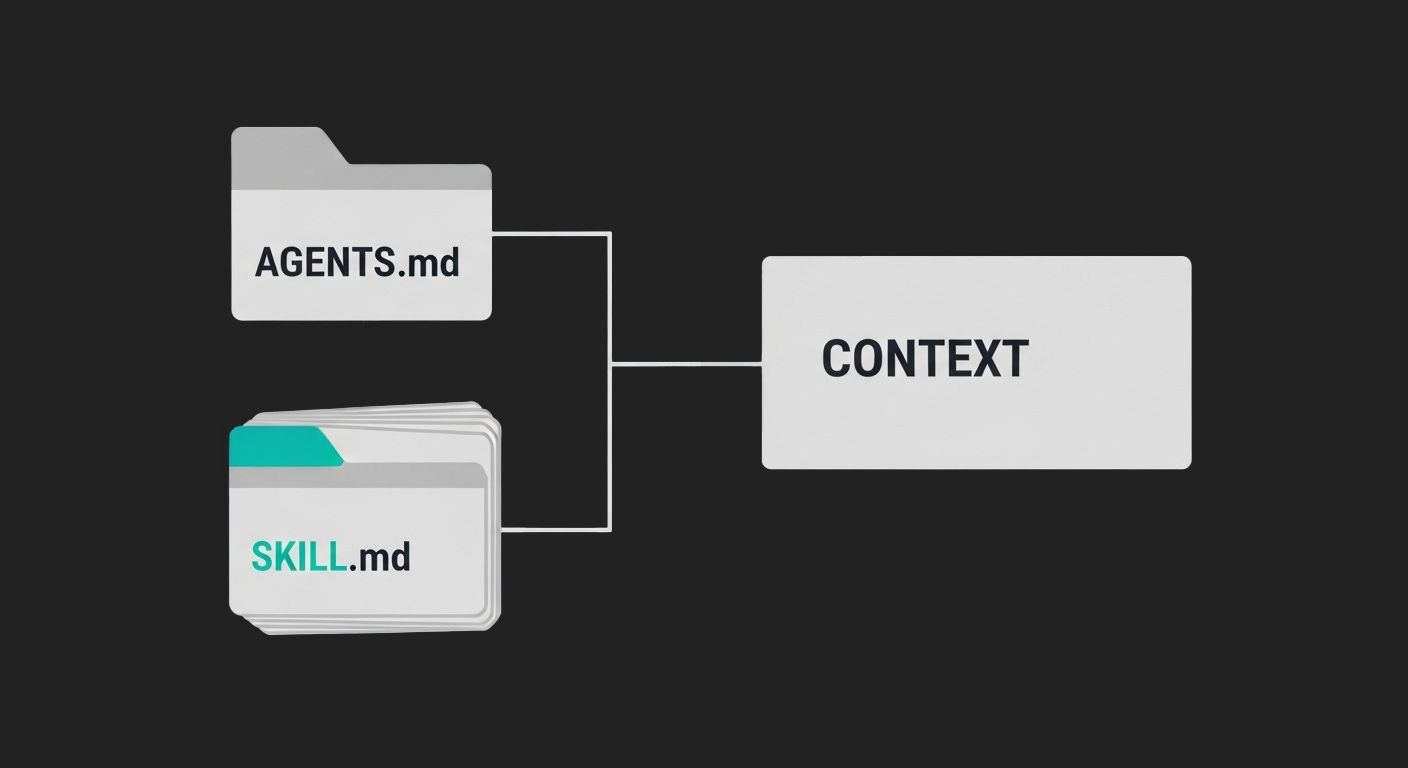
If you have used Anthropic Claude, the pattern will look familiar because it also uses SKILL.md files with YAML headers and Markdown bodies. The main difference is that Codex stops at a simple ## Skills section, while Claude can decide to read a skill body into context or run scripts associated with a skill in some setups.
If you maintain other tools that use SKILL.md files, such as Superpowers style skill libraries, you can reuse their documents by placing compatible SKILL.md files under ~/.codex/skills. Codex will pick up any file that has a valid name and description, and those skills will show up in the ## Skills section. The orchestration and automation still live in the external tool.
8. Clarifying a few common questions
Two questions have already come up in early discussions about Skills. It helps to answer them explicitly.
How are Skills different from more AGENTS.md files?
Skills and AGENTS.md do related but different jobs. AGENTS.md is tied to a repo, can be a long narrative project doc, and is pasted into the prompt in full (up to the byte limit). A Skill is a small named handle under ~/.codex/skills with a one line description and a body you maintain for humans, and it only appears as a compact entry in a global ## Skills block (name: description (file: path)). In practice, AGENTS.md is for “how to work in this codebase”, while Skills cover habits and playbooks you want available in every codebase, like the d2-diagrams workflow.
Are Skills just tools with a different name?
Skills are not tools. Tools are executable capabilities such as the shell, MCP servers, HTTP clients, and test runners that Codex can call to do work. Skills are documentation: a SKILL.md that explains a workflow and when to use it, and Codex only sees the short entry in the ## Skills section, not an API surface. The relationship is one way: a Skill can describe how to use tools (“run d2 like this”, “call our deploy script like that”), but Skills never execute code on their own.
9. Limits and failure modes
Skills ship as an experimental feature.
They are controlled by a
skillsfeature flag that is off by default.Behavior and format may change, and you should expect breaking changes over time.
There are a few practical limits worth naming explicitly.
Global scope, no project scoped skills yet
Today, Skills are global to
~/.codex/skills. There is no first class project scoped skills feature.Mitigation: keep repo specific rules and architecture notes in
AGENTS.md. Reserve Skills for workflows you genuinely reuse across repos.
Broken SKILL files fail
Invalid YAML or fields that violate the constraints show up in a startup message, and invalid skills are ignored.
Mitigation: Fix or remove broken
SKILL.mdfiles.
Skill bloat and token cost
Each skill entry adds a line to the
## Skillsblock. Hundreds of long descriptions will make that section noisy and eat into the context window.Mitigation: keep
nameanddescriptionshort and concrete. Periodically prune unused skills and move “maybe useful someday” notes back into personal docs.
Path visibility
The model sees the absolute path to each skill file. This is intentional so it can refer to specific files, but it may reveal parts of your filesystem layout.
Mitigation: avoid putting sensitive directory names into the skills path, and be mindful of screenshots or logs that include the
## Skillsblock.
From a safety perspective, skills are conservative.
Each skill contributes only a couple of short lines to the prompt.
The body of the skill never reaches the model unless you or a tool explicitly paste it into the conversation.
Skills do not execute code on their own, and they do not change what commands Codex can run.
10. Variants and team setups
The simplest way to start is as a single user.
Pick two or three workflows you already reuse in three or more repos.
Create a
SKILL.mdfor each under~/.codex/skills.Keep
nameanddescriptionshort and concrete so the## Skillssection stays readable.
For teams, it helps to treat Skills like code.
Keep shared skills in a small Git repository that teammates clone under
~/.codex/skills/shared.Review changes to shared
SKILL.mdfiles the same way you review application code.Encourage each person to maintain their own personal skills alongside the shared library so they can experiment without polluting the team set.
If you already have a source of SKILL.md files, such as a Superpowers skills library, you can copy compatible skills into ~/.codex/skills to seed your library. The Skills feature then gives you a consistent list of skills across tools without forcing you to adopt a single orchestration layer.
Over time, a small curated set of well named skills tends to work better than a giant catalog. It keeps the ## Skills section useful and keeps you honest about which workflows are actually worth codifying.
Further reading
At the time of writing there is very little public material on Codex Skills. The most useful reference is the Codex CLI change set that introduces the feature:
Codex CLI PR introducing Skills – the pull request that add Skills support to the CLI: <https://github.com/openai/codex/pull/7412>
If you found this useful, you can subscribe to get future deep dives on practical Codex workflows and agentic development patterns.
Love the pattern of treating workflows as a library instead of constantly re-pasting runbooks. The distinction between Skills (global habits) and AGENTS.md (repo-specific docs) is super clean. The compact Skills section approach keeps token costs down while still giving Codex visibility. Curious how well this scales when you have 20+ skills across a team.